Checkouts
Overview
The hosted checkout is a customizable, pre-built payment page hosted on Getpaid's servers. You can tailor its appearance to match your brand and choose which payment methods to offer buyers. The hosted checkout manages the entire payment process, including authentication and verification, to provide a seamless and secure experience for your customers.
Lifecycle
| Status | Description |
|---|---|
initiated | The checkout has been created but it was not rendered yet. |
started | The checkout was rendered and the customer has started the payment process. |
in_progress | The checkout and a payment are in progress (e.g., awaiting payment confirmation). |
completed | The checkout has been successfully completed. |
failed | The checkout has failed because all payment attempts were unsuccessful. |
unattempted | The checkout has unattempted and there were no payment attempts and the time limit was reached. |
Steps
1. Create a checkout
Your first step is to create a checkout via API by calling POST api.getpaid.io/v2/checkouts
endpoint, by setting the payment information and how funds are split
between the parties involved.
{
  "reference": "ORD-202510-0232",
  "amount": 1000,
  "currency": "EUR",
  "description": "Order #202510-0232",
  "splits": {
    "type": "per_transaction",
    "accounts": [
      {
        "type": "seller",
        "id": "acc_4f5zanqzxfg9w9jj5e81bm6bc9",
        "split": {
          "type": "fixed",
          "amount": 900
        }
      },
      {
        "type": "platform",
        "id": "acc_4q90qx2kdczs59yqfq34p09qx6",
        "split": {
          "type": "fixed",
          "amount": 100
        },
        "processing_fee": {
          "percentage": 100
        }
      }
    ]
  },
  "redirect": {
    "default": "https://titanauto.com/checkout/complete?order=202510-0232"
  },
  "webhooks": {
    "url": "https://webhooks.titanauto.com/getpaid"
  }
}
2. Handle the checkout response
A successful checkout creation returns a checkout id and a flow.next_step.url to present the checkout to the
buyer.
{
  "id": "cko_44678r08jtm8zbt227tzhc4nw5",
  "status": "initiated",
  "reference": "ORD-202510-0232",
  "created_at": "2025-10-24T13:45:22.993Z",
  "updated_at": "2025-10-24T13:45:22.993Z",
  "expires_at": "2025-10-24T14:15:22.993Z",
  "flow": {
    "next_step": {
      "type": "redirect",
      "url": "https://checkout.getpaid.io/v2/cko_44678r08jtm8zbt227tzhc4nw5?token=eyJhbGciOiJIUzI1NiJ9.eyJzdWIiOiIxIn0.SflKxwRJSMeKKF2QT4fwpMeJf36POk6yJV_adQssw5c"
    }
  },
  "payment_methods": {
    "available": [
      {
        "type": "card",
        "scheme": "mastercard"
      },
      {
        "type": "card",
        "scheme": "visa"
      },
      {
        "type": "sepa_direct_debit"
      }
    ]
  }
}
3. Redirect to hosted checkout
You can either redirect the buyer to the hosted checkout URL immediately or send them the link to pay later, as long as the checkout has not expired.
4. Checkout rendered
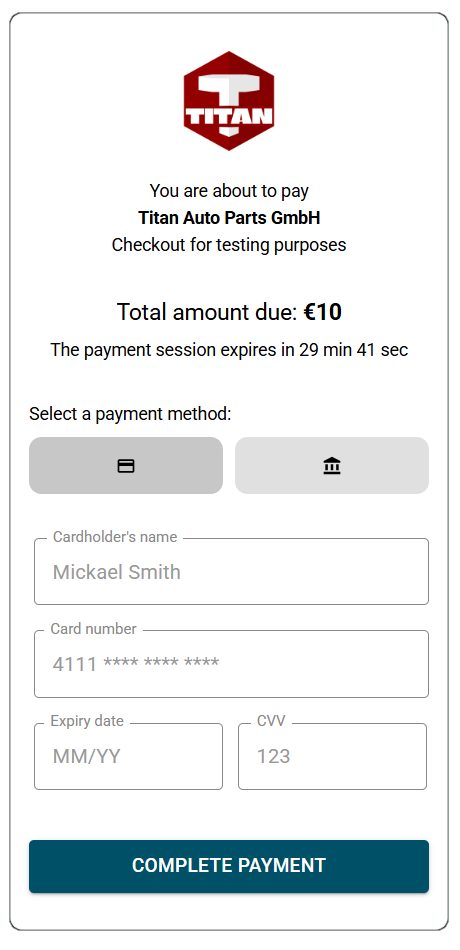
Once the buyer is redirected or clicks the payment link, the checkout page is displayed in their browser, showing the available payment methods to complete the payment.
5. Enter payment details
The buyer can select their preferred payment method and will be guided through the required steps to complete the payment and checkout.
If a payment method is declined, the buyer can retry with another method, maximizing the conversion rate.
6. Redirect to platform website
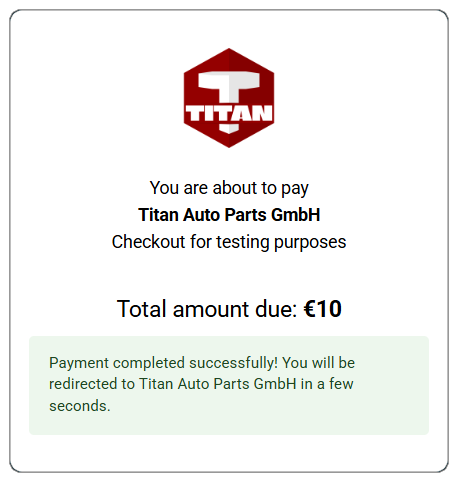
Once the payment is successful, the buyer is redirected to your website, as specified in the redirect block during checkout creation, allowing your client-side to update or fetch the payment and checkout status from your system.
7. Checkout completed notification
After the checkout is completed, your platform server — set in the webhooks block during checkout
creation — receives a checkout_completed
webhook.
In case the checkout is not completed on time or is not successful, check the other checkout webhooks to get notified of the checkout status changes.
In case the checkout is not completed on time or is not successful, check the other checkout webhooks to get notified of the checkout status changes.
You can then update your records with the successful payment.
{
  "id": "evt_4jbfjc3dfybnw9f15en0rve844",
  "type": "checkout_completed",
  "version": "v2",
  "occurred_at": "2025-10-24T13:52:57.312Z",
  "data": {
    "id": "cko_44678r08jtm8zbt227tzhc4nw5",
    "reference": "ORD-202510-0232",
    "payment": {
      "id": "pay_4kf9v6xp00hzc99rdwr5m97wce"
    }
  }
}